

Best Small Business Website Builder for South Africa
September 17, 2026 · 17 min read · Bronwyn Furno
You've made the products, photographed them in good light and told friends that your online shop is coming soon. Then you search for a website builder and meet a wall of templates, payment settings, plugins, hosting plans and unfamiliar words. For a Cape Town jewellery maker, a Durban baker or a small clothing brand in Gqeberha, that choice can feel bigger than the business itself.
The best small business website builder for South Africa isn't the one with the prettiest homepage or the lowest advertised price. It's the one that helps customers discover your products, pay with methods they trust, choose delivery clearly and complete an order comfortably from a phone. It should also let you manage the everyday work without needing a developer for every small change.
South African online retail is already a meaningful market. Retailer disclosures place online retail turnover at about R96-billion in 2024, while estimates for 2025 and 2026 put the market above R150-billion for the first time and above roughly 10% of total retail. More than 11 million South Africans are estimated to shop online, compared with about 9 million in 2024. You can explore the market context in this South African ecommerce market overview.
This guide starts with the basics, then compares hosted and self-hosted builders, identifies the functions a local shop needs, explains total cost and gives you a practical testing checklist. If you want a broader look at ecommerce platforms before choosing a builder, Refact's ecommerce platform guide is a useful companion. By the end, you should feel able to choose a platform that matches your budget, confidence and plans for growth.
Table of Contents
- Introduction to Finding Your Online Store Home
- What a Small Business Website Builder Really Does
- Hosted SaaS Versus Self Hosted Builders Compared
- Key Features Every South African Store Needs
- Pricing Scalability and Total Cost Explained
- Your Evaluation Checklist and Migration Tips
- Why Shopstar Is the Smart Choice for Local Sellers
Introduction to Finding Your Online Store Home
Think of your website as the small shop customers visit after seeing your product on Instagram or receiving a WhatsApp recommendation. The shelves are your product pages, the till is your checkout, the storeroom is your inventory system and the front door is your mobile homepage. If any one of those parts is confusing, shoppers may leave before they buy.
A beginner often starts with the wrong question: “Which builder has the most templates?” A better question is, “What must happen between someone discovering my handmade earrings and receiving them at home?” That journey includes a clear product photo, a useful description, a trusted payment option, delivery information, an order confirmation and a way for you to keep track of stock.
South African businesses also operate in a market where digital adoption is still uneven. Research from the Research ICT Africa network found that 65% of microenterprises own a smartphone, but only 38% use the internet in their business and 39% are financially included. The same research records a rise in microenterprise internet use from 24% in 2018 to 38%, while showing that many very small firms still don't have a strong online presence. These figures come from the Research ICT Africa policy paper on South African microenterprises.
Start with the selling journey
A good builder should make the first version of your shop manageable. You'll want to add products, create collections, connect payments, set delivery areas, check orders and update the site from a phone or laptop. You don't need every advanced feature on day one, but you do need the basics to work together.
That's why local context matters from the start. A builder designed around card-only checkout may not suit your buyers. A platform with attractive themes but weak stock management can create headaches once an item sells at a market and online at the same time.
Practical rule: Choose the website builder that removes the most daily admin, not the one that gives you the longest feature list.
By the time you finish, you should have a clear way to compare platforms on effort, local payments, delivery, mobile selling, compliance and total cost. You'll also know when a simple hosted platform is enough and when the control of self-hosting might justify extra work.
What a Small Business Website Builder Really Does
A website builder is like renting a ready-made shop instead of buying an empty plot and building the walls yourself. The platform provides the structure, electricity and basic security. You choose the layout, paint the walls with your brand colours, place your products on the shelves and decide how customers pay.
In practical terms, a small business builder usually brings several jobs into one place. It helps you design pages, keeps those pages online, displays your shop on mobile devices, accepts orders and gives you a dashboard for managing the business. Some builders focus mainly on information pages, while ecommerce platforms add product catalogues, carts, payments and delivery tools.
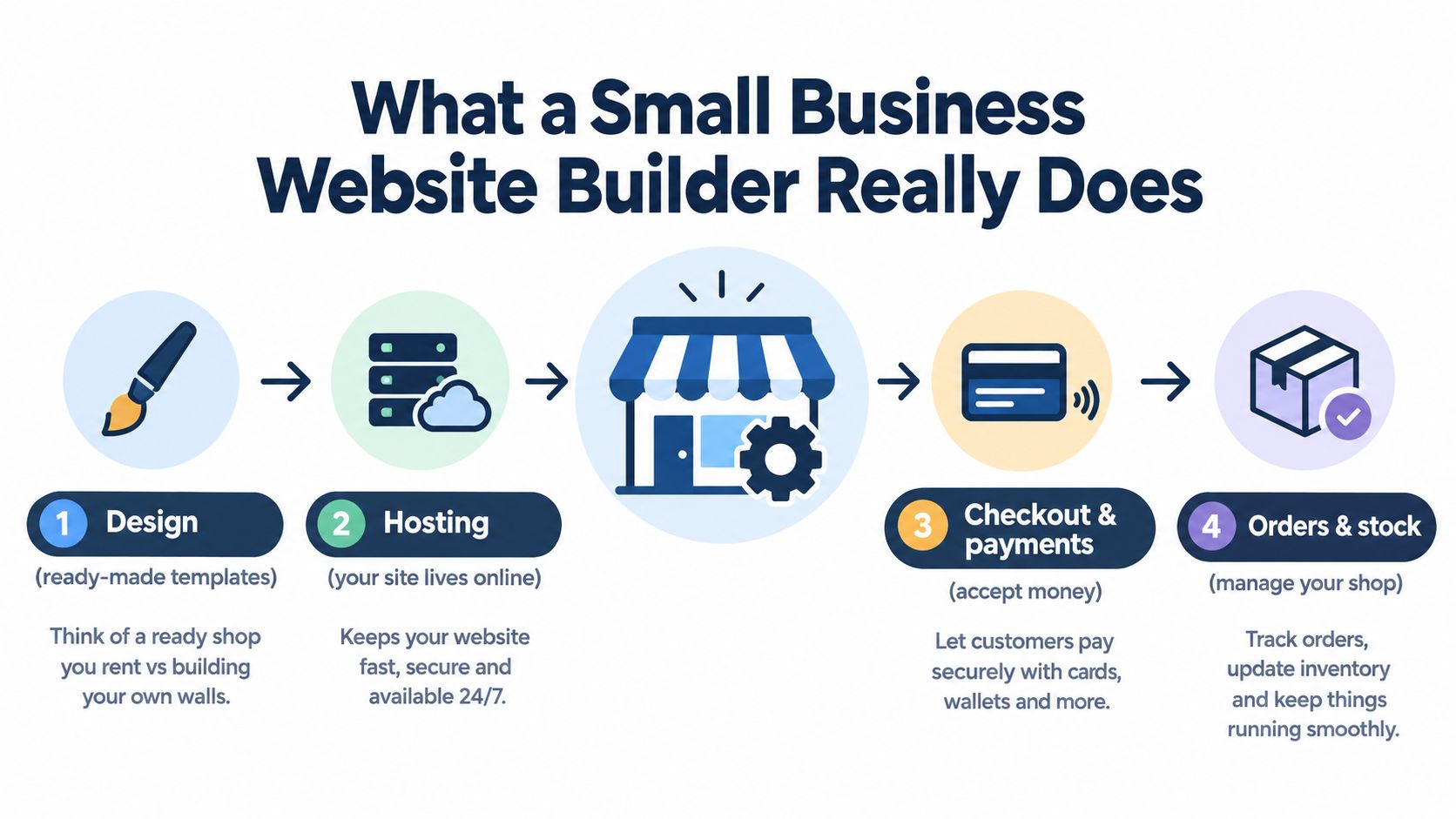
The four jobs your builder should handle
Design gives you ready-made pages and themes. You can change your logo, colours, images, product sections and wording without writing code. Drag-and-drop editing works much like rearranging furniture in a room. You click an element, move it or edit it, then preview the result.
Hosting means your website lives online. You don't need to find a separate computer or manage the technical service that delivers your pages to visitors. A hosted platform generally bundles this behind the scenes.
Checkout and payments turn interest into a sale. The customer needs to add a product to a cart, enter delivery details and choose a payment method. For a South African shop, that can include cards and instant EFT, depending on the builder and its payment integrations.
Orders and stock help you run the shop after the sale. You should be able to see what was purchased, reduce available stock, update order status and review basic performance information from a central dashboard.
What you don't need to know
You don't need to become a web developer before selling a beaded necklace or a jar of chilli sauce online. You do need to learn your own product information, delivery rules and customer service process. The builder should handle the technical plumbing while you focus on accurate descriptions, good photographs and fulfilling orders properly.
The important distinction is not “technical person versus non-technical person”. It's less maintenance versus more control. That choice leads to the hosted and self-hosted approaches.
Hosted SaaS Versus Self Hosted Builders Compared
Hosted SaaS, which means software delivered as an online service, gives you a ready-to-use environment. You sign in, select a plan, build the shop and let the provider handle much of the underlying maintenance. Self-hosting gives you more control, but you're responsible for arranging hosting and keeping the software, themes and add-ons working.
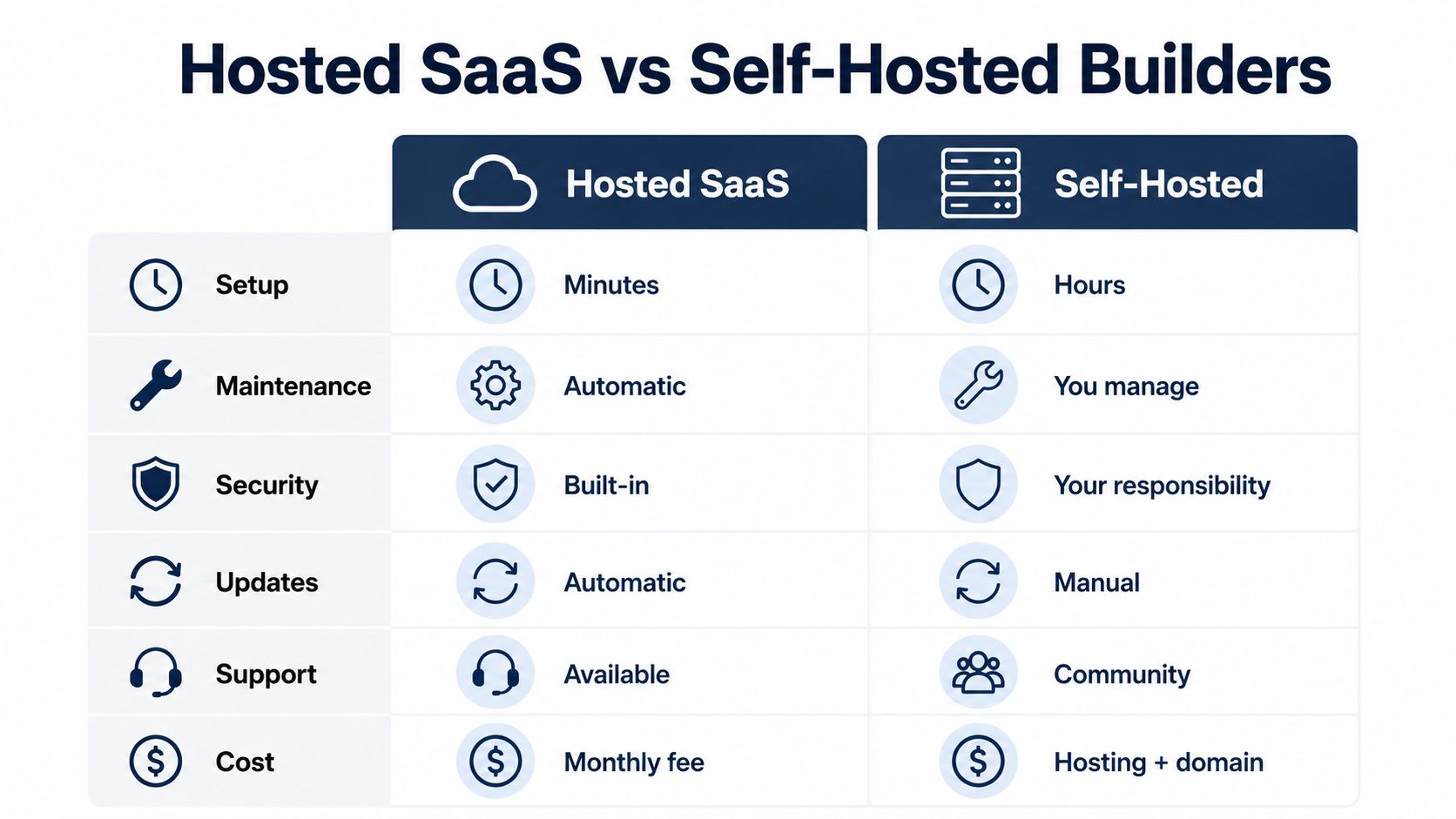
| Decision area | Hosted SaaS | Self-hosted |
|---|---|---|
| Setup | Usually guided and quicker | Requires more configuration |
| Maintenance | The provider manages core upkeep | You manage updates and fixes |
| Security | Many protections are built into the service | You carry more responsibility |
| Updates | Usually handled automatically | You need to apply and test them |
| Support | Provider support is available | Help often comes from documentation or a community |
| Flexibility | Simpler, with platform boundaries | Broader control through themes and plugins |
Hosted is about focus
For a first-time seller, hosted SaaS can feel like opening a stall at a well-run market. The tables, power and basic venue rules are already in place. You still need to arrange your products and serve customers, but you won't spend your Saturday morning repairing the stall.
That simplicity has a trade-off. You work within the provider's design and integration choices, and your ongoing costs usually include a recurring plan. If the platform doesn't support a payment provider, shipping workflow or feature you need, you may have limited ways to add it.
Self-hosted is about control
A self-hosted builder, such as WordPress with ecommerce extensions, can offer extensive customisation. You can choose a hosting provider, install themes and add tools for SEO, memberships, content or product management. That can suit a business with technical help or a clear need for a custom system.
The responsibility is heavier. You may need to update plugins, resolve conflicts, monitor security, arrange backups and find help when something breaks. A small business owner who wants to spend time making products may decide that control isn't worth the extra attention.
For a practical comparison of store approaches, you can also read Shopstar versus Shopify. The key decision is simple: choose hosted if you want to run the shop rather than the technology, and choose self-hosted if you have the skills or support to manage the additional moving parts.
Key Features Every South African Store Needs
The right builder should support the way your customers shop. A beautiful template won't compensate for a checkout that doesn't offer familiar local payment options or a delivery setup that leaves customers guessing about the final cost.
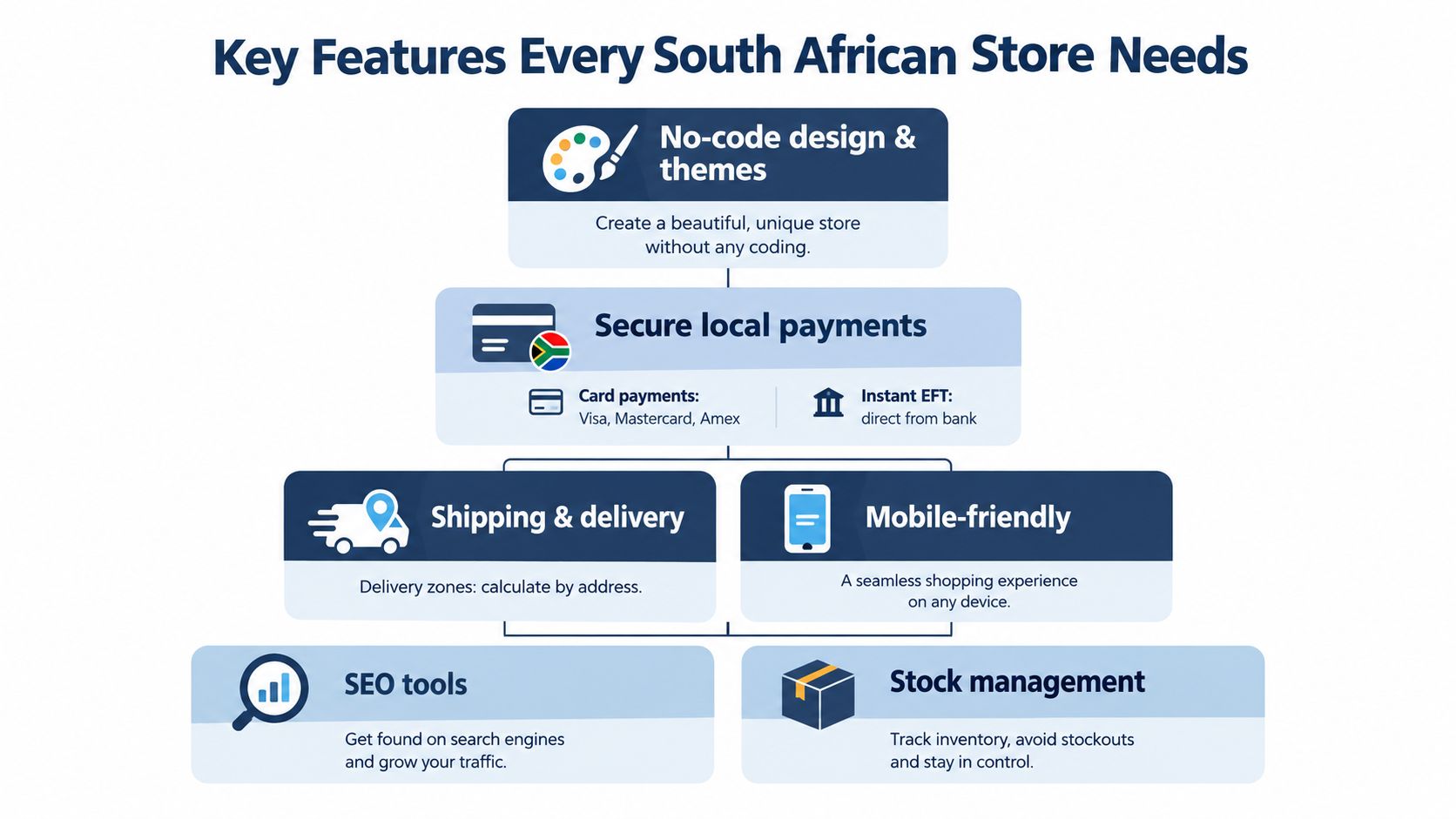
A useful benchmark for South African builders is operational consolidation. Local market listings highlight features such as drag-and-drop editing, ecommerce plugins, payment gateways, shopping carts and dashboard-based order or export management as important capabilities for small business sites. The South Africa website builder market outlook provides background on this local emphasis.
Make the shop easy to use
Start with a no-code editor and a theme that already resembles the kind of shop you want to run. A jewellery brand might need large product photography, variation choices and collection pages. A home baker may need product availability, collection dates and clear delivery areas. The less time you spend fighting the layout, the more time you have to improve the offer.
Your store must also work on a phone. South African shoppers commonly discover products through social channels, so your product links should open cleanly from Instagram, Facebook and WhatsApp. Your pages need readable text, clear buttons and images that load without making customers wait.
Treat payment choice as part of selling
Local checkout support is a business requirement, not a nice extra. South African shoppers use cards, bank transfers, e-wallets, cash and other methods. One market breakdown lists cards at 43%, bank transfers at 22%, e-wallets at 20%, cash at 9% and other methods at 6%, with Visa representing 52% and Mastercard 47% of card usage. These figures are reported in PPRO's South Africa payment methods overview.
Instant EFT and card payments can make checkout feel familiar, while clear payment confirmation helps you reconcile orders. Payfast's 2025 State of Pay report says nearly 70% of surveyed businesses saw sales increase by up to 50% after adopting digital payments, as summarised in this South African ecommerce payments guidance.
Keep delivery and admin together
Choose a builder that lets you set delivery zones, shipping charges and collection options clearly. Then look for inventory, order status, exports and analytics in the same dashboard. Fewer separate tools mean fewer places to update when a product sells out or a delivery rule changes.
POPIA also belongs on your checklist. Your store collects names, contact details and delivery information, so check what privacy settings, customer notices and data controls the platform provides. You don't need to become a legal specialist, but you should understand what information you collect and why.
For a plain-language look at checkout choices, this guide to online payment methods can help you compare the options before you activate them.
Pricing Scalability and Total Cost Explained
A low monthly fee doesn't automatically make a builder affordable. Your real cost includes the plan, payment charges, shipping tools, domain expenses, paid apps, design help and the time you spend maintaining the shop.
South African guidance places typical monthly operating costs for a small ecommerce business at about R2,000 to R8,000, depending on the setup and needs. That range appears in Shopify's guide to starting an ecommerce business in South Africa. Treat it as a planning reference, not a promise that every store will cost the same.
The market itself is expanding. South African online retail grew by 35% in 2024 to an estimated R96-billion, around 8% of total retail sales, and projections placed 2025 above R130-billion, approaching 10% of national retail turnover, according to Mastercard's 2025 online retail release. A growing market creates opportunity, but it also makes it important to choose a platform that won't become expensive or awkward as orders increase.
Calculate the full monthly picture
| Cost element | What to check | Why it matters for SA sellers |
|---|---|---|
| Platform plan | What is included in the monthly subscription? | A lower plan may exclude the store tools you need |
| Transaction fees | Does the builder charge a platform fee on each sale? | Fees affect your margin as order volume grows |
| Payment gateway | What does each payment provider charge? | Local payment choice must fit your pricing |
| Shipping | Are delivery rules, labels or integrations extra? | Confusing delivery costs can stop a sale |
| Apps and add-ons | Which functions require separate subscriptions? | Several small add-ons can create app sprawl |
| Domain and email | Is your domain included, and for how long? | A branded address supports customer trust |
| Your time | How much upkeep does the platform require? | Technical chores have a real business cost |
Compare value, not just entry price
A self-hosted platform may look inexpensive before you add hosting, premium themes, security work and technical support. A hosted service may cost more as a fixed subscription, but it can reduce the number of separate decisions you need to make.
As your shop grows, watch three things: payment fees as a share of each order, the cost of extra apps and the time needed to manage products and orders. Review the platform's pricing page carefully, including limits and renewal terms. Shopstar's pricing and features is an example of the detail you should look for when comparing a platform.
The right question is, “What will this cost me to sell reliably?” That answer is more useful than asking which builder has the cheapest starting plan.
Your Evaluation Checklist and Migration Tips
Don't choose a builder after watching only a polished demonstration. Build a small test shop and follow the customer journey yourself. Add one product, view it on your phone, complete a test checkout and check whether the resulting order is easy to understand from the seller's side.
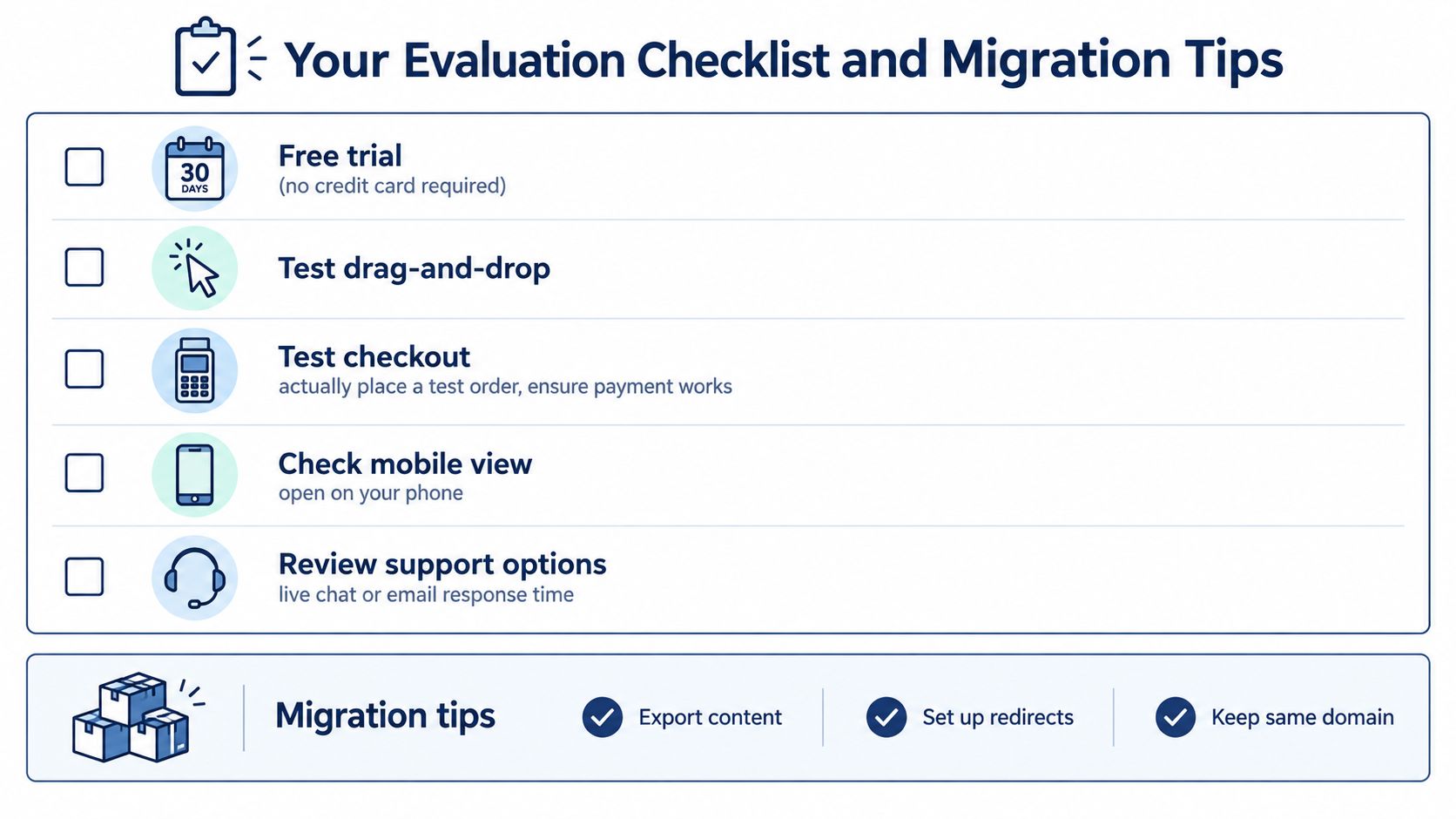
Test before you commit
Use this sequence when comparing platforms:
- Start a trial: Check whether you can explore the shop without entering card details. A trial should give you enough access to understand the workflow, not just view a sales page.
- Edit a real product: Try changing the title, price, photographs, stock and description. If simple edits feel difficult, daily administration will become tiring.
- Run a test checkout: Select a South African payment option, enter a delivery address and inspect the confirmation email or order record. Don't assume that a payment logo means the complete flow works for your store.
- Open the shop on your phone: Check image cropping, button size, menu navigation and checkout speed. Your own phone is a better test than a desktop preview alone.
- Ask support a specific question: Ask about local payments, shipping rules or POPIA-related settings. Notice whether the answer is clear and practical.
Move without losing your customers
Migration sounds technical, but the planning is straightforward. First, save your product descriptions, photographs, prices, variants, customer information and order records in a format you can keep. Then build the new store privately while the existing one continues taking orders.
Keep the same domain where possible, because returning customers already know it. Create a redirect plan for old product or information pages so visitors don't land on broken addresses. Publish during a quiet period, place a test order and check your contact details, payment confirmation and delivery wording before announcing the change.
Before switching: Keep the old store available until the new checkout, product links and customer messages have all been tested.
If you're unsure how to weigh platform control against future needs, Netco Design LLC's advice on choosing a website platform offers another useful perspective. You don't need a perfect migration plan, but you do need a saved copy of your important information and a clear fallback.
Why Shopstar Is the Smart Choice for Local Sellers
For a South African maker who wants to launch an online store without taking on technical maintenance, Shopstar brings the core ecommerce work into one place. It offers a no-code drag-and-drop designer, ready-made themes, product management, local payments, shipping, orders, inventory and analytics through a single dashboard.
That combination matters because a small business owner often plays every role. You're photographing products, answering WhatsApp messages, packing parcels, checking stock and marketing the next collection. Moving between separate tools can make a simple sale feel like a small accounting project. A unified dashboard gives you one place to see what needs attention.
Built for local selling habits
Shopstar supports selling through Google, Instagram, Facebook and WhatsApp, which suits makers whose customers discover products socially before visiting a shop. It also provides local Customer Success support from Cape Town, so beginners can ask for help in the same local context as their customers and delivery partners.
The platform offers a 14-day free trial without a credit card, transparent pricing and low transaction fees. Shopstar also reports a 4.9-star rating from South African entrepreneurs and showcases local stores through its Stars of Shopstar stories. Those details don't remove the need to test the platform yourself, but they give you useful signals when comparing a local ecommerce-first option with a general website builder.
A simple launch path
Start with your strongest products, not your entire catalogue. Choose a clean theme, write descriptions that answer common customer questions, set your delivery areas, activate suitable payment methods and test an order from your phone. Then share the store link through the social channel where your audience already spends time.
For many first-time sellers, the sensible choice is a hosted platform that lets you concentrate on making and selling. You can always review your needs later, but you don't need to begin with a complicated technology project.
Shopstar gives South African makers a no-code store builder with ready-made themes, local payments, shipping, inventory, orders, analytics and social selling in one dashboard. Visit Shopstar to use the 14-day free trial without a credit card, test your mobile checkout and start building a store that fits the way you sell.


