Ecommerce Website Cost in South Africa: A Complete Guide
September 27, 2026 · 16 min read · Elizora Yarnell
A typical South African ecommerce website can be launched for somewhere between R3,000 and R25,000 for a lean setup, with running costs usually adding R2,000 to R7,000 per month once payments, shipping, and platform fees are included. The final ecommerce website cost depends on whether you're opening a simple online shop yourself, using a hosted platform, or paying for a custom build.
You may be in the same position as many local makers: you have products ready, a name in mind, and customers asking whether they can buy online. Then a developer sends a quote that seems manageable, but nobody explains what you'll pay after launch. A store can look affordable on launch day and still strain your cash flow through platform subscriptions, payment fees, courier charges, stock tools and marketing.
This guide separates the once-off setup from the monthly cost of keeping your store open, using South African rand examples and a practical budget for a small jewellery business.
Table of Contents
- What Counts as the Cost of an Ecommerce Website
- A Real First Store Budget for a South African Maker
- DIY, Hosted Platforms, and Custom Builds Compared
- Once-Off Build Costs Explained
- Monthly Costs That Keep Your Store Running
- What Quietly Drives the Price Up and How to Keep It Down
- Building Your Own Ecommerce Budget With Confidence
What Counts as the Cost of an Ecommerce Website
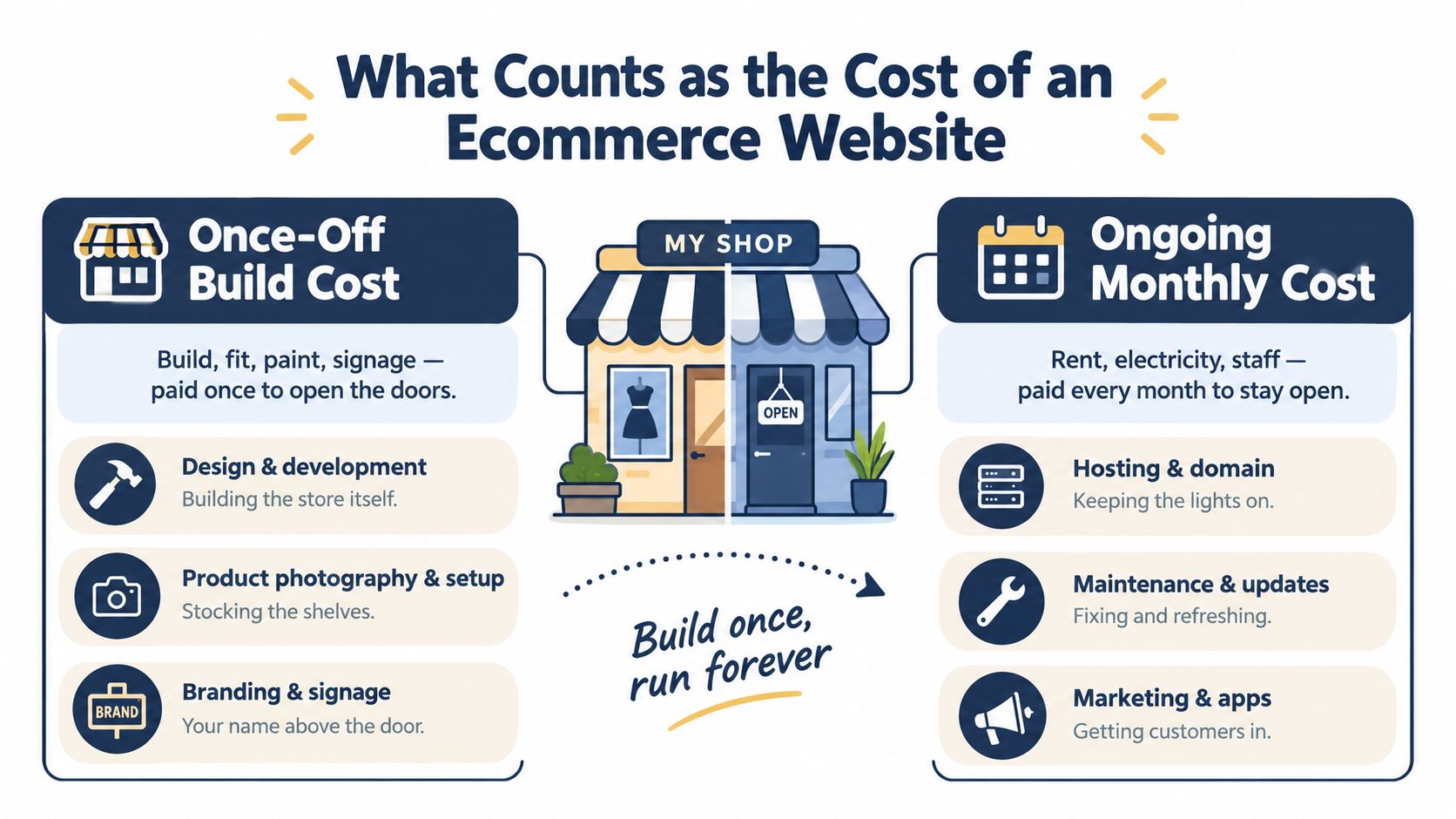
Think of an online store like a small physical shop. Building the shop covers the shopfront, shelves, paint, signage and checkout counter. Running the shop covers rent, electricity, staff, cleaning and the supplies you keep buying after opening day.
An ecommerce website works in much the same way. Your once-off budget may include design and development, a domain name, a theme, product setup, photography, copywriting and the initial payment and shipping connections. These costs help you get the doors open.
Your ongoing budget keeps those doors open. It may include hosting or a platform subscription, domain renewals, maintenance, marketing apps, email software, payment processing and delivery costs. A platform may bundle some of these items together, while a self-hosted store may charge for each separately.
The two buckets to write down
Start your spreadsheet with two columns:
- Once-off setup: design, development, theme customisation, product uploads, photography, logo work, legal pages and initial integrations.
- Monthly or per-sale running costs: platform fees, hosting, maintenance, payment gateway charges, courier fees, email tools, inventory tools and advertising.
A lean South African launch is often estimated at about R3,000 to R9,000 in the first month, including items such as CIPC registration at R175, a .co.za domain at R80 to R120 per year, hosting or platform fees from roughly R200 to R700 per month, PayFast setup at R0 and launch marketing of R2,000 to R5,000, according to this South African ecommerce cost guide. The guide concludes that a legitimate store can launch for under R10,000.
For a broader explanation of how to budget for a custom ecommerce site, look at the features and services included in the quote, not only the headline figure. The most common beginner mistake is accepting a build price without asking what happens in month two.
A Real First Store Budget for a South African Maker
Sipho is a Cape Town jewellery maker selling beaded earrings and simple brass necklaces. She has product stock, a smartphone with a good camera and a small audience on Facebook. She doesn't need a complex catalogue or a custom checkout. She needs a trustworthy store that accepts local payments and sends parcels around South Africa.
She starts with a short, memorable .co.za domain. Allowing around R200 to R400 a year for registration gives her room to compare providers and choose a name that matches her brand. She chooses a hosted ecommerce platform with a monthly fee rather than paying a developer to maintain a separate server.
Sipho's launch choices
Her first spending list looks like this:
- Domain: R300 for the first year.
- Platform: a hosted plan paid monthly, with the exact amount depending on the provider and features.
- Photography: R0, because she uses her phone, daylight and a clean background.
- Product setup: her own time to add names, prices, sizes, materials and care instructions.
- Payments: PayFast or Yoco, with no large integration project at this stage.
- Shipping: one basic courier option for local door-to-door delivery.
- Packaging: jewellery boxes, tissue paper, courier bags and stickers.
- Launch promotion: a small Facebook advert budget and printed business cards for existing customers.
Beginners often misunderstand the quote. Her domain and payment connection may be inexpensive, but her packaging and promotion still affect the amount she needs before the first order arrives. A store isn't ready just because the checkout button works.
Separating launch from the first six months
Sipho sets a lean setup budget of R8,500. That amount covers her domain, platform preparation, simple brand assets, packaging, product setup and launch promotion. It doesn't include a large stock purchase because she already owns the jewellery she plans to sell.
She then plans a separate six-month operating budget. If her platform, basic tools, payment-related charges, courier activity and small promotional efforts average R3,500 per month, six months adds R21,000. Her combined setup and first six months therefore come to roughly R29,500.
The monthly figure is a planning example, not a universal price. Sipho's actual payment and delivery costs will change with order volume, parcel destinations and the platform she selects. She should record every transaction and courier charge from the first sale instead of relying on memory.
Practical rule: Keep the launch budget and the operating budget on separate lines. A store can be affordable to open and expensive to run if you don't track both.
DIY, Hosted Platforms, and Custom Builds Compared
There are three sensible ways to open an online shop. The cheapest option in cash often asks for the most time. The option with the simplest monthly administration may cost more than doing everything yourself, while a custom build can be unnecessary until your business has more complicated needs.
| Option | Typical ZAR Cost | Time to Launch | Skill Needed |
|---|---|---|---|
| DIY builder | R0 to R10,000 for setup, depending on tools and help | Days to several weeks | Comfortable with templates, products and settings |
| Hosted platform | R0 to R20,000 for a basic launch, depending on design and setup | Days to a few weeks | Basic digital skills and product knowledge |
| Custom build | R30,000 to R85,000 for many growth-oriented SME projects, with enterprise work potentially exceeding R500,000 | Several weeks or longer | A clear brief, testing and an experienced developer or agency |
DIY gives you control, but charges you in time
With a DIY builder, you choose a template, add products, write pages and configure payments yourself. You can start with little upfront spending, but you remain responsible for layout problems, image sizes, product variants, plugin choices and updates.
WooCommerce, Shopify and Wix can all support online selling, but their setup experience and ongoing add-ons differ. A DIY route suits a maker who has a small product range and is willing to learn by doing.
Hosted platforms reduce the technical work
Hosted platforms such as Shopstar, Shopify and Wix usually combine hosting, security, templates and store administration in one dashboard. Some also include payment and shipping connections, although you still need to check transaction charges and plan limits.
For beginners comparing platforms, this guide to the best ecommerce platform for beginners is useful because the important question isn't only the monthly price. Check whether the platform supports your local payment methods, delivery approach, product types and preferred sales channels.
Custom builds solve specific problems
A custom store makes more sense when your catalogue, pricing rules, customer accounts, stock systems or fulfilment process require something standard platforms can't handle. South African estimates place entry-level store builds around R6,000 to R25,000, growth-focused SME builds around R30,000 to R85,000, and fully custom enterprise work above R500,000 in some cases, as outlined by this local ecommerce pricing analysis.
Don't pay for custom work merely because a bespoke design sounds impressive. First prove that your products sell online, then invest in features that remove a real business problem.
Once-Off Build Costs Explained
A quote becomes easier to judge when you break it into line items. Two developers may use the same phrase, “ecommerce website”, while including completely different amounts of design, content, testing and product setup.
| Cost Item | Lean DIY Range (R) | Hosted Build Range (R) | Custom Build Range (R) |
|---|---|---|---|
| Domain name | R150 to R600 | R150 to R600 | R150 to R600 |
| Hosting or platform setup | R0 to R500 | R0 to R2,500 | R5,000 to R20,000+ |
| Theme or template | R0 to R500 | R0 to R3,000 | R5,000 to R20,000+ |
| Logo and product photography | R0 to R1,500 | R500 to R5,000 | R2,000 to R8,000 |
| Payment gateway integration | Usually R0 | Usually R0 to R2,000 | R2,000 to R10,000+ |
| Stock upload and content | R0 to R1,000 | R500 to R5,000 | R3,000 to R15,000 |
| SSL and legal pages | Free templates to R500 | Free templates to R3,000 | R1,000 to R5,000 |
What each line really pays for
Your domain is the address customers type into their browser. The amount is usually billed upfront, and renewal matters because losing the domain can disconnect customers from your brand.
Hosting or a platform setup fee gives the store somewhere to operate. Hosted services often include technical infrastructure in the monthly plan, while custom or self-hosted stores may require separate setup and maintenance.
A theme controls the shop's layout. A free template can work well for a focused jewellery or clothing range, but a custom design takes more planning, design work and testing. The same principle applies to a logo and photography. A phone can produce usable images, but a professional supplier may improve consistency across a larger range.
Payment gateway setup is often free or relatively light for a basic store, but the gateway charges you when customers pay. Your quote should also state who will configure refunds, failed payments and order notifications.
Content includes product descriptions, size information, care instructions, delivery pages and policies. Legal pages such as terms, refunds and a POPIA notice may use free templates or cost roughly up to R3,000 when drafted for the business, depending on the supplier and scope.
A basic South African store is commonly estimated at R6,000 to R25,000, while semi-custom SME builds sit around R30,000 to R85,000, according to this analysis of South African ecommerce website pricing. If you're comparing providers outside South Africa, even a resource about how to choose an ecommerce agency Melbourne can help you understand which questions to ask about design, development and scope. Local pricing and payment requirements still need separate checking.
For Sipho, a lean setup might be R8,500. A custom store with custom design, integrations, content work and testing could reach R45,000. Neither figure is automatically right or wrong. The better choice depends on what she needs to sell safely and manage without unnecessary complexity.
Monthly Costs That Keep Your Store Running
Your store can receive no orders in a particular week and still create expenses. The platform subscription, accounting software, email tool and maintenance bill don't wait for a busy sales month.
Gateway and delivery costs are different because they grow with orders. South African guides commonly place payment gateway charges around 2.0% to 3.5% plus fixed charges, while delivery can range from roughly R50 to R200 per shipment, depending on the courier and collection model, as explained in this guide to the real first-year ecommerce cost.
| Monthly Cost Item | Starter (R) | Growing (R) | Established (R) |
|---|---|---|---|
| Platform or hosting | R0 to R1,500 | R1,500 to R4,500 | R5,000+ |
| Email and marketing tools | R0 to R700 | R700 to R2,000 | R2,000+ |
| Accounting software | R300 to R900 | R300 to R900 | R900+ |
| Maintenance and updates | R0 to R1,000 | R1,000 to R3,000 | R2,500 to R4,500+ |
| Courier and shipping | Per shipment | Per shipment | Per shipment |
| Payment processing | Per transaction | Per transaction | Per transaction |
The bills behind each order
A starter platform may cost nothing or up to R1,500 per month, while advanced plans can reach R2,500 to R4,500. Custom hosting and maintenance retainers may cost R5,000 or more, depending on the work included.
Email tools can range from free options to R700 per month at starter level. Accounting software such as Xero or Sage may add R300 to R900 per month. Inventory apps, customer messaging tools and paid advertising sit on top of these costs.
Shipping needs careful pricing. If you offer free delivery, you haven't removed the courier charge. You've moved it into your product margin or absorbed it as a marketing cost. A delivery page should state where you deliver, what customers pay and whether collection is available.
For more detail on estimating delivery charges before setting your prices, use this practical shipping cost guide. A useful monthly budget should include both fixed subscriptions and variable costs that rise with each order.
A small-store operating picture
A small store with regular weekly orders may land in the R3,500 to R6,500 monthly range before marketing, depending on its plan, tools, payment activity, maintenance and delivery arrangements. That's a planning range, not a promise, and your transaction volume can move it considerably.
One point catches new owners off guard: payment and shipping together can materially reduce the amount left from each sale. Price products after checking these costs, packaging, returns and discounts, rather than copying a competitor's price and hoping the margin works.
Shopstar's South African ecommerce running-cost guide is another useful reference when comparing the monthly layer against the initial build quote.
What Quietly Drives the Price Up and How to Keep It Down
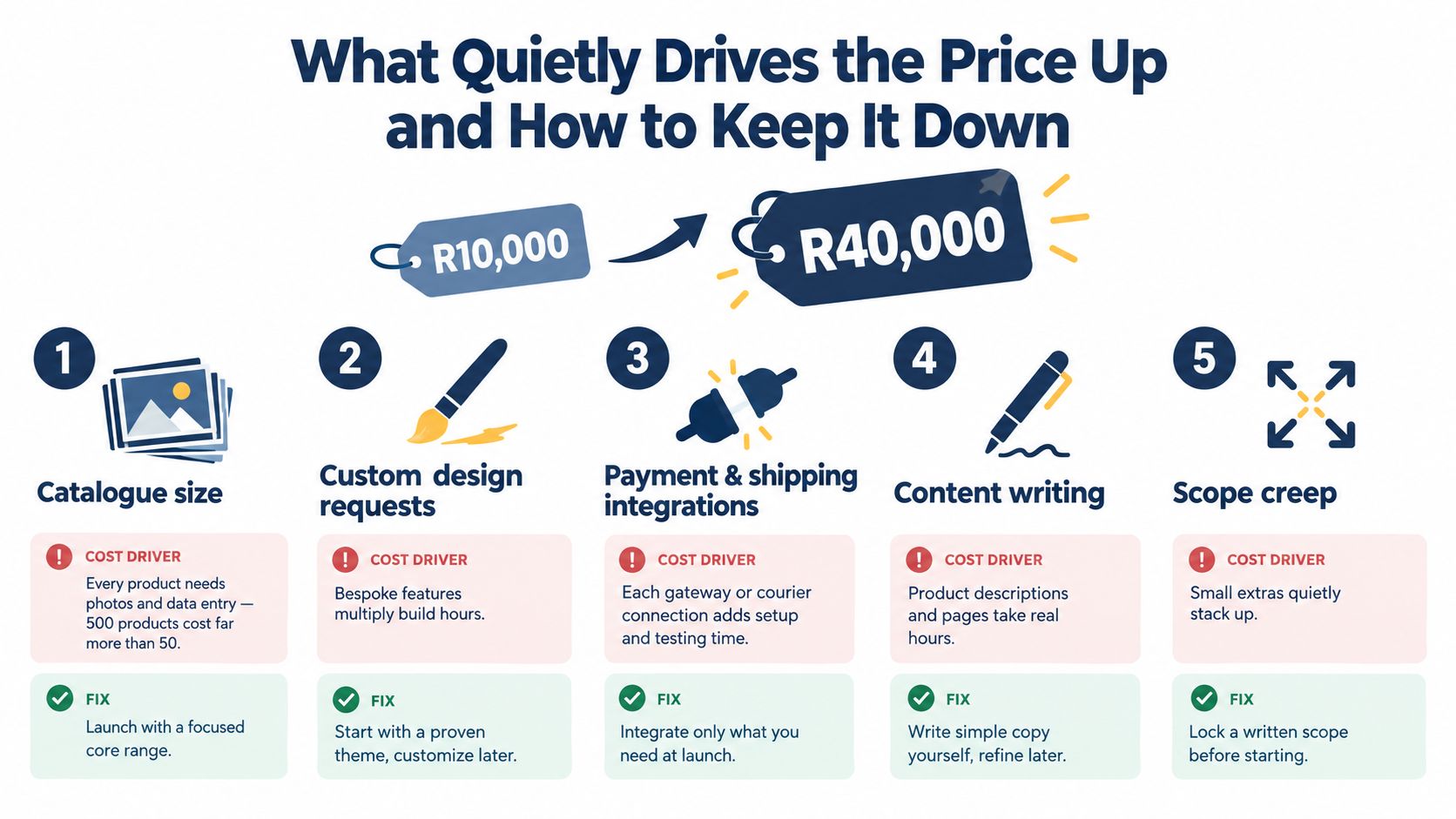
A store with ten products is not the same job as a store with hundreds of products. Someone must photograph, name, describe, categorise, price and test every item. Variants such as colour, size and material create more combinations for the owner or developer to manage.
Payment and shipping choices also add work. Each connection needs configuration, testing and customer-facing instructions. Real-time delivery rates, tracking, loyalty schemes, gift cards, subscriptions and multi-currency pricing can move a project away from a simple template store and towards a custom build.
Control the first version
Use these decisions to protect your budget:
- Start with a focused range: Launch with your strongest products instead of importing the entire catalogue. A smaller range reduces photography, data entry and testing.
- Choose one payment route: Add the payment method most customers can use, then expand after you understand failed payments and refunds.
- Keep delivery simple: Begin with one courier or collection option instead of building several real-time rate connections.
- Write the core copy yourself: Use clear descriptions for launch, then improve pages after customers ask questions.
- Freeze the brief: Agree on pages, features, integrations and revisions before development starts. New requests should be priced separately.
The purpose isn't to cut corners that affect trust or payment security. It's to decide what belongs in version one. A jewellery shop may need strong product images, clear material details, secure payment and reliable delivery before it needs a loyalty programme or complex currency rules.
A written scope protects both sides. Ask whether the quote includes product uploads, mobile layouts, payment testing, shipping rules, policy pages, analytics and post-launch fixes. When these items are missing, the quote may look low because you are still carrying the work.
Building Your Own Ecommerce Budget With Confidence
You don't need a complicated financial model. A one-page sheet with two cost columns can give you a much clearer view of the project.
Four decisions to make
- List your must-haves. Write down the products, pages, payment method, delivery method and customer information you need on launch day.
- Separate setup from running costs. Put design, content and configuration under once-off costs. Put platform fees, tools, payment charges, delivery and marketing under monthly or per-order costs.
- Add a contingency. Keep a 15% buffer for surprises such as extra content work, courier changes or gateway-related charges. The four-step planning approach in the supplied budgeting visual also recommends keeping a 15% to 20% buffer, so choose a level that matches how much uncertainty remains in your project.
- Review the budget monthly. Compare actual platform, payment, courier and advertising costs with sales. Change prices or features when the numbers show a problem.
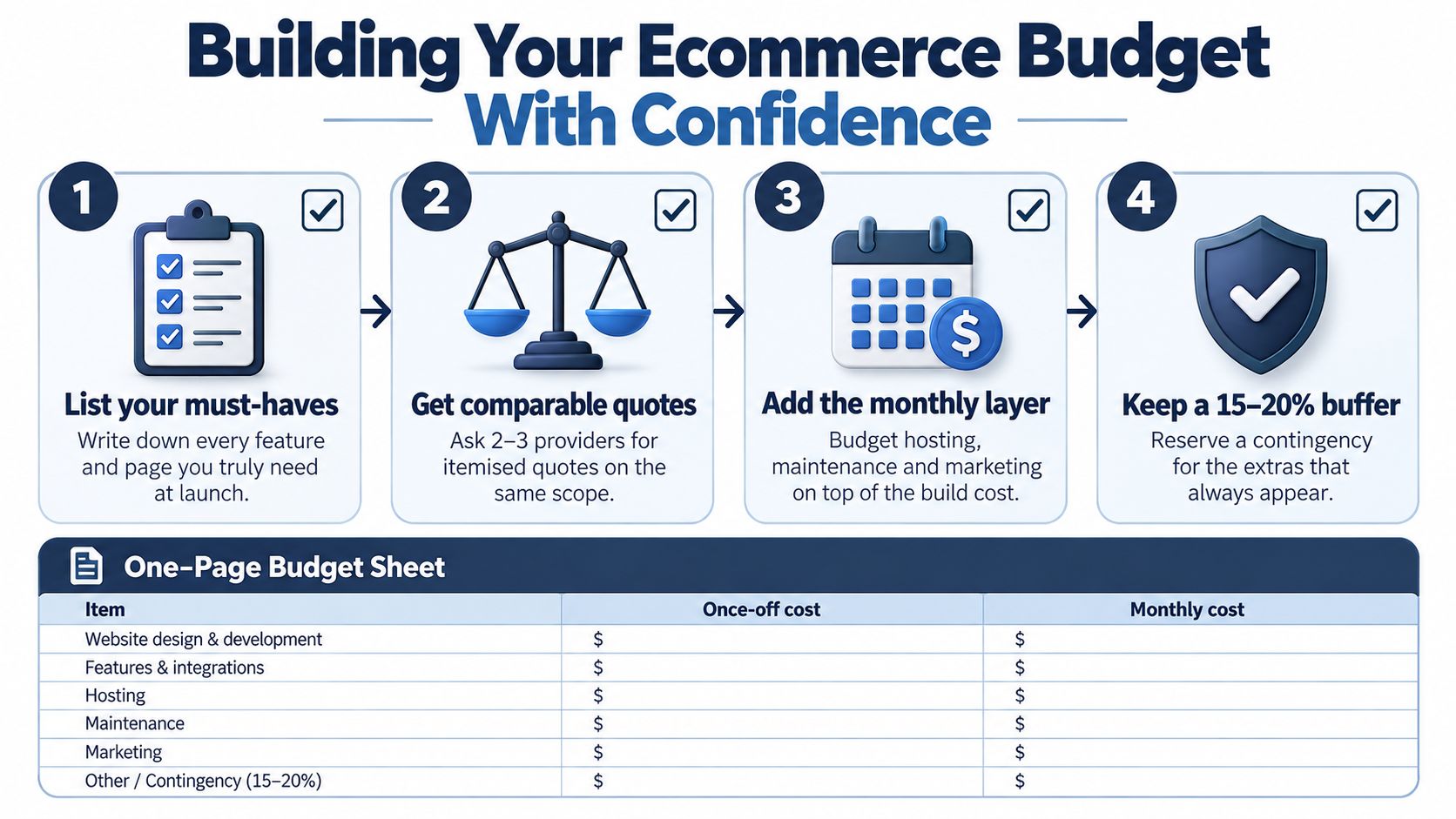
A worked example makes the framework easier to use. If your setup costs R8,000 and your monthly run-rate is R3,500, the first year is roughly R50,000 before adding a contingency or unusually high marketing and delivery costs. The calculation is simple: combine the once-off setup with twelve months of planned operating costs.
Your budget should answer two questions: “What must I pay before launch?” and “What must I keep paying after the first order?”
Write your own version today. Name the platform, list every setup line, record the monthly fee, estimate payment and delivery costs, then choose a launch date. Once the figures sit beside real decisions, the ecommerce website cost stops being a vague worry and becomes a plan you can manage.
Shopstar offers a no-code, drag-and-drop store builder with ready-made themes, local payments, shipping, orders, inventory and analytics in one dashboard. Visit Shopstar to compare the available starting options and turn your line-by-line budget into a practical launch plan.