Universal Product Codes: A Beginner's Guide
September 24, 2026 · 14 min read · Elizora Yarnell
Universal product codes are the 12 or 13-digit barcodes every physical product needs to be scanned at checkout. In South Africa, most retail products use the 13-digit EAN-13 format, while UPC-A is the related 12-digit format used mainly in North America.
You might be launching a handmade jewellery brand from your dining-room table, or adding candles to a small online shop after selling them at weekend markets. Your first orders arrive, and everything feels manageable until someone asks for a barcode. Suddenly, a simple product seems to need a code, a product record, a price, and a reliable way to track every variation.
That code isn't just a set of black lines. It gives a product a consistent identity across packaging, stock records, point-of-sale systems, retailers, and marketplaces. For a South African store owner, understanding universal product codes early can prevent avoidable problems when a product moves from Instagram or WhatsApp into formal retail.
Table of Contents
- Why Your Products Need a Universal Product Code
- The Anatomy of a Barcode, How the Numbers Work
- UPC vs EAN, Understanding the Difference for South Africa
- How to Obtain GS1 Barcodes in South Africa
- Best Practices for Printing and Scanning Your Barcodes
- How Barcodes Impact Returns and Consumer Rights
Why Your Products Need a Universal Product Code
A customer hands you a lavender candle at a market stall. You look at the product, remember its price, and type the amount into a card machine or sales app. The next customer buys a larger candle in a different scent, and you repeat the process. By the end of the day, every sale depends on your memory and manual entry.

A universal product code gives each physical product a digital identity. When a scanner reads the pattern, the connected system finds the product record, which can include its name, price, and stock information. The barcode doesn't store every piece of product information inside the stripes. It points systems towards the correct record.
That distinction matters for a growing online store. A handmade jewellery business might sell the same necklace in gold, silver, and rose gold. Those aren't just three photos of one product. They're separate stock items that need separate identification if you want accurate inventory and retail records.
Barcode versus SKU
New store owners often confuse a barcode with a SKU. A SKU is an internal stock-keeping label that your business creates for its own organisation. A barcode identifier, such as a GTIN represented by an EAN-13 barcode, is designed to work across trading partners and sales channels.
You can use a SKU alongside a barcode in your store. A practical guide to SKU numbers can help you keep those two systems separate from the beginning.
Practical rule: Use the barcode to identify the product across businesses, and use the SKU to organise it inside your own business.
For a South African ecommerce founder, this setup turns a product catalogue into something easier to manage. A product can keep the same identity on its packaging, in your stock records, and in a retailer's system. That consistency becomes especially important when you add variants, use a fulfilment partner, or apply to sell through a chain.
Universal product codes don't replace good product data. They make it easier for each system to retrieve the right data without someone retyping the product details at every step.
The Anatomy of a Barcode, How the Numbers Work
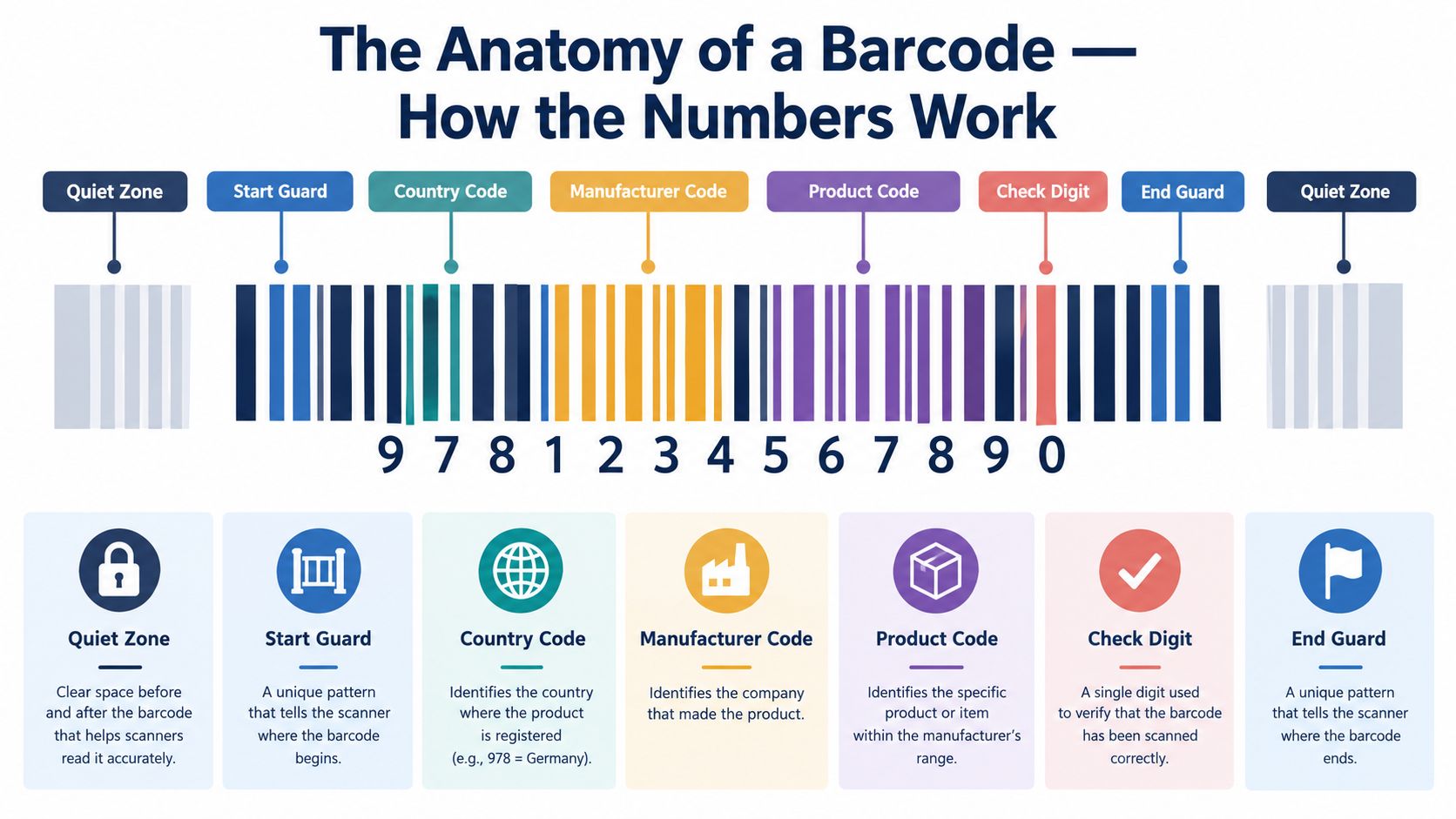
A barcode looks random because the stripes are hard to read with the naked eye. The number printed underneath is easier to understand. It identifies the product through a structured numbering system and includes a final digit that helps confirm whether the code has been entered or scanned correctly.
A standard UPC-A uses 12 digits. Its number is associated with the company or brand, the individual item, and a check digit. The exact allocation of digits can vary within the numbering system, so you shouldn't assume that every block always has the same length.
Reading the main parts
Think of the code as a shared language between your product and the scanner.
- Company or manufacturer section: This connects the code to the registered company or brand.
- Product section: This identifies the specific item within that company's range.
- Check digit: This is calculated from the preceding digits. It helps the system detect an incorrect number.
- Guard patterns and quiet zones: The scanner uses the surrounding spaces and line patterns to understand where the barcode begins, ends, and can be read.
The number isn't a product description. It doesn't tell a cashier that a bottle contains a particular flavour or that a necklace is a particular colour. Instead, the retailer's database links the identifier to that information.
That's why you shouldn't invent a sequence of digits and turn it into stripes with a free generator. A self-created number may look like a barcode, but it won't necessarily connect to a recognised company and product record. The GS1 South Africa barcode guidance directs businesses towards recognised standards and training for this reason.
A small business should also understand the difference between a barcode image and a product identifier. You can generate the visual symbol after you have a valid identifier, but creating the visual symbol first doesn't give your product a legitimate identity.
This short visual explanation can help you see how the scan connects the physical label to a digital record:
If you change a product in a way that affects how it's sold or tracked, treat it as a distinct item. A 250 ml candle and a 500 ml candle, or a small and large bracelet, need separate identifiers because a store must distinguish their prices and stock.
UPC vs EAN, Understanding the Difference for South Africa
The names create unnecessary confusion. UPC-A has 12 digits, while EAN-13 has 13 digits. Both belong to the wider GS1 family of retail identifiers, and both use a check digit to help validate the number.
The practical choice for a South African retail product is usually EAN-13. South African retail barcodes are typically based on the EAN-13 system, which is the most commonly used merchandise barcode format locally, according to South African barcode guidance.
| Format | Digits | Practical context |
|---|---|---|
| UPC-A | 12 | Associated mainly with North American retail |
| EAN-13 | 13 | Commonly used for merchandise in South African retail |
| GTIN | 8, 12, 13, or 14 | The broader identification system that includes these formats |
South African systems are built to read EAN-13 and other accepted EAN/UPC retail families. That doesn't mean a UPC-A is automatically unusable in South Africa. Local guidance notes that both formats are used, but a brand selling into South African chains should confirm the retailer's requirements before printing packaging.
What the prefix tells you
Many South African retail barcodes use the 600 to 601 range in the EAN or GS1 numbering structure. The first three digits of many locally registered retail barcodes therefore signal South African registration, while later digits identify the company and product, followed by the check digit. This is a registration indication, not proof that every part of the product was manufactured in South Africa, as explained in this overview of South African barcode prefixes.
For a jewellery maker, the decision is straightforward in practice. Ask the retailer or marketplace which identifier it accepts, obtain the code through the correct route, and make sure the number on the product listing matches the number on the package.
Don't buy packaging based only on the word “UPC”. A supplier may use that term loosely for a retail barcode. Confirm whether you need an EAN-13, UPC-A, or another GTIN format before your labels go to print.
How to Obtain GS1 Barcodes in South Africa
GS1 South Africa is the local authority for retail barcodes. Its role is more than supplying a picture of black stripes. It provides the standards and registration structure that helps retailers connect an identifier to the correct business and product.
Start by deciding which products need their own codes. Every distinct SKU variant, such as a colour, flavour, size, or pack size, needs a unique GTIN. A blue medium T-shirt and a black large T-shirt shouldn't share one identifier if a retailer needs to price and count them separately.
A practical registration route
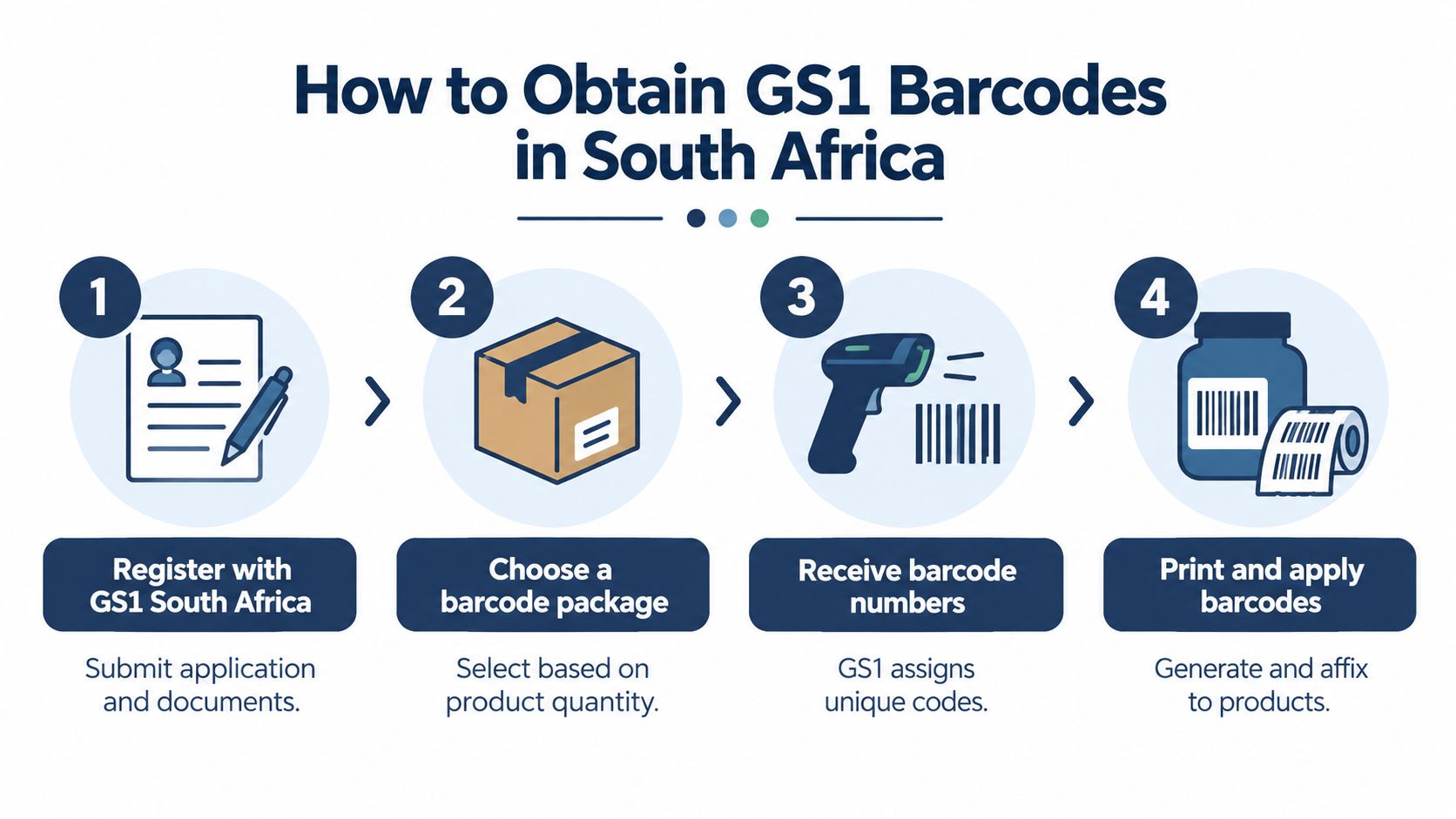
- Prepare your product list. Write down each product and variant you plan to sell. Include pack sizes and options, not just the main product name.
- Register with GS1 South Africa. Submit the application and the business information requested by the organisation. The GS1 South Africa guidance explains why identifiers should be linked to the correct company record.
- Choose the appropriate package. Your needs depend on how many products and variants you expect to register. Consider future products rather than assigning one number to several different items.
- Assign and manage the identifiers. Once the numbers are available, connect each one to one product record. Keep a simple master spreadsheet with the product name, variant, SKU, GTIN, packaging status, and listing status.
- Create the barcode artwork. Turn the valid identifier into the correct barcode symbol, then place it on the package according to print and scanning requirements.
- Check every product record before launch. The number printed on the package must match the number in your catalogue, retailer file, and marketplace listing.
A reseller-issued code may look cheaper for a small business, but acceptance depends on the retailer's registration system. Some retailers may require direct GS1 registration, while others may accept reputable reseller codes. Local reporting on acquiring barcodes in South Africa highlights this difference.
A low upfront price can become expensive if a growing brand later has to replace packaging, correct catalogue records, or re-register products.
Don't treat the barcode as an isolated purchase. Retailers and marketplaces may verify whether the identifier connects to the right company and product information. Incorrect sourcing can affect retailer validation, price-file matching, and catalogue onboarding, especially when your business moves from informal selling into formal retail.
Best Practices for Printing and Scanning Your Barcodes
A valid number can still fail if the printed barcode is too small, blurred, crowded by artwork, or placed where a scanner can't see it. A jewellery brand may have limited space on a small box or tag, but reducing the barcode until it looks neat can make the product difficult to scan.
A South African retail barcode guide gives a standard size of about 38 mm wide by 25 mm high, with a smallest recommended size of 80% of standard, or about 30 mm by 20 mm. Check the South African retail barcode sizing guide before designing compact packaging.
Make the physical label reliable
Keep the barcode on a flat, clean area where the stripes won't wrap around a tight curve. Leave clear space around it, avoid placing text or decorative patterns inside that space, and use strong contrast between the bars and the background.
Before ordering a large print run, test a physical sample with the type of scanner your retail or fulfilment partner uses. A barcode that works on your phone may still need checking on a point-of-sale scanner, receiving scanner, or warehouse device.
Scanning connects the product to the stored record. Once the system reads the identifier, it can retrieve the correct item details for checkout, receiving, stock counts, and price files. That reduces manual typing and helps staff avoid confusing a small candle with a larger version that looks almost identical.
Keep online and offline data aligned
Your online catalogue should use the same identifier that appears on the physical product. Store the barcode beside the SKU, product title, variant, cost, selling price, and stock quantity. If your store platform supports inventory management, use that system as the working record rather than keeping one version in a spreadsheet and another version in a notebook.
For a practical approach to stock control, see this guide to inventory management for a small business. The principle is simple: one product variant, one clear record, one matching identifier across every channel.
Don't reuse a code after changing the product into a different sellable variant. When you change the size, colour, flavour, or pack quantity, review whether the item now needs a separate GTIN before printing new labels.
How Barcodes Impact Returns and Consumer Rights
A barcode doesn't decide whether a customer receives a refund. It helps you identify exactly which product the customer bought, which variant was supplied, and which item should return to stock or go to inspection.
That matters when an online customer sends back a piece of jewellery in a different size, or reports that a candle arrived damaged. If the order record, product listing, packaging, and stock system all use matching identifiers, you can trace the item without relying on a vague description such as “the blue one”.
South African online stores must also account for statutory return rights. The Consumer Protection Act gives buyers a 6-month right to return defective goods for repair, replacement, or refund, as summarised in this guide to online shopping rights in South Africa. The Electronic Communications and Transactions Act is widely summarised as providing a 7-day cooling-off period after the customer receives the goods, with exceptions that include perishables, personalised items, and unsealed digital media.
Build returns around the product record
Your returns workflow should capture more than the order number.
- Identify the exact item: Match the barcode or GTIN to the product and variant in the order.
- Record the reason: Separate defects, incorrect items, transit damage, and cooling-off returns.
- Inspect before restocking: A returned item may need a quality check before you sell it again.
- Keep the listing accurate: Product descriptions, images, variant names, and packaging should describe the item the buyer receives.
A jewellery maker selling personalised pieces needs particular care because personalised products can fall within exceptions to ordinary cooling-off rights, while defective goods still require appropriate handling. Don't copy a returns policy from an overseas template and assume it fits a South African store. The consumer protection laws guide offers a useful starting point for understanding the obligations that affect online sellers.
Good barcode management won't remove your legal duties. It makes it easier to apply those duties consistently.
Set up your product records before your first campaign launches. Register the appropriate identifiers, assign one to each variant, print a test label, and connect the same data to your online catalogue and returns process. Shopstar provides online-store tools for products, orders, inventory, local payments, shipping, and analytics, which can help a South African maker keep these records together. Visit Shopstar to start building your store and organise your product data before your first sale.